

In this article
- Why people remove seals and objects from scans
- The manuscript: a wax seal over part of the page
- Why removing an object from old paper is harder than it looks
- How the object removal worked
- The result
- What object removal can and can't recover
- Other marks you can remove the same way
- A word on ethics: removing authentication marks
- How to remove a wax seal from a document scan yourself
- Final thoughts
Most document restoration is about keeping things. You protect the signatures, the printed border, the official seal, and you take away only the stains and damage around them. Every so often, though, the job runs the other way. A wax seal, a rubber stamp, a sticker or a label is sitting on top of the page, and what you actually want to see is the page without it. Maybe you're studying the layout of a historical manuscript, preparing a clean image for a book or an exhibition panel, or simply want a version of an old family document where a later addition isn't getting in the way. This guide shows how to remove a wax seal from a document scan, using a real manuscript as the example.
The short answer is that this is done entirely on a digital copy. You scan the document in colour, mark the seal or object you want gone, and use AI object removal to take it out and rebuild the paper and texture underneath so the page looks continuous. The original document is never touched, and the seal itself stays exactly where it is on the real page.
This article walks through a real example: a historical manuscript with a wax seal covering part of the page. You'll see why removing an object from old, stained paper is harder than it sounds, how the reconstruction was done, what this kind of tool can and can't recover, and where the ethical line sits when the mark you're removing is a seal or stamp of authority.
Why people remove seals and objects from scans
There are plenty of good reasons to want a clean version of a page, and very few of them have anything to do with changing what a document says. Researchers often want to see the full layout of a manuscript, including the margins and the paper surface that a seal happens to sit on, so they can compare it with other pages from the same collection. Writers, publishers and museums frequently need a tidy image for a book, a website or an exhibition panel, where a large lump of wax or a modern library sticker would distract from the thing they're actually trying to show.
Family historians have their own reasons. An old letter or deed might have picked up a price label from an antique shop, a strip of yellowed tape from an earlier repair, or a bold archive stamp added decades after the document was written. None of those things were part of the original, and a clean display copy can make the page easier to read and nicer to frame.
In every one of these cases, the edited image is a working copy or a display copy. It sits alongside the untouched scan, not in place of it, and the physical document stays exactly as it is.
The manuscript: a wax seal over part of the page
The document in this case study is a historical manuscript with a wax seal pressed onto part of the page. Wax seals were once the standard way to close a letter or mark a document as genuine, and many survive on old papers today. They're beautiful objects in their own right, but they're also thick, raised and opaque, and on this page the seal covered an area that would otherwise have shown more of the sheet.
The paper itself was far from clean. Like most old manuscripts, it had aged unevenly, with stains, discolouration and variations in tone across the sheet. That detail turns out to matter a great deal. On a crisp modern page, filling the space left by a removed object is fairly simple, because the background is close to plain white. On an old manuscript, the background is part of the character of the document, and any patch that doesn't match it stands out immediately.
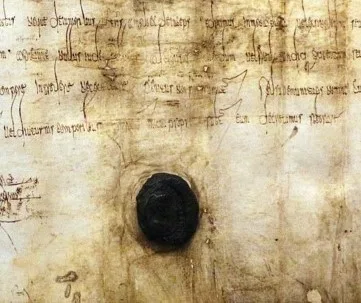
Before: a wax seal covering part of the manuscript.
Why removing an object from old paper is harder than it looks
The obvious way to get rid of a seal in a photo editor is to select it and fill the area with a colour picked from the paper nearby. On an old manuscript, that almost always looks wrong. Aged paper is never one flat colour. It shifts gradually from lighter to darker areas, it carries faint stains and tide marks, and it has a visible grain and fibre texture when you look closely. A single-colour fill sits on top of all that like a sticky note, smooth and lifeless, and anyone looking at the image will spot it straight away.
The edges cause problems too. A raised wax seal doesn't just cover the paper; it often casts a slight shadow in the scan, leaves a ring of discoloured paper or wax residue around its rim, and sometimes has small cracks or flakes spreading out from it. If you remove only the seal and leave that halo behind, the page ends up with a ghostly outline of the thing you were trying to get rid of.
Then there's whatever sits right next to the seal. If there is writing, a fold line or a printed edge close by, the reconstruction has to blend into it without blurring or bending it. Hand-cloning that kind of area is slow and fussy, and repeated cloning tends to leave tell-tale repeating patterns in the paper texture. A convincing result needs the rebuilt area to match the tone, the stains and the grain of the paper around it, all at once.
How the object removal worked
The process followed three straightforward stages, and none of them involved touching the manuscript beyond placing it on a scanner.
Stage one was the scan. The manuscript was scanned in colour at a resolution high enough to capture the paper texture and the edges of the seal clearly. Colour is essential here, because the tool needs to see the real tones of the surrounding paper, including its stains and discolouration, in order to rebuild the hidden area convincingly.
Stage two was marking the object. The seal was selected as the area to remove, including its rim, any shadow it cast in the scan and the residue around its edge. Taking in that outer ring is a small step that makes a big difference, because it stops a faint outline being left behind once the seal itself is gone.
Stage three was reconstruction. Object removal then took the seal out and rebuilt the paper beneath it. Instead of filling the gap with flat colour, it reconstructed the paper and its texture to match the surrounding sheet, carrying through the natural tone changes, the staining and the grain. The aim was for the rebuilt patch to look as aged as the rest of the page, so that nothing about it suggests it was ever covered.
As with any restoration, the last step was a careful look at the result, zoomed in, comparing the edges of the reconstructed area with the paper around it and checking that nothing nearby had been blurred or shifted.
The result
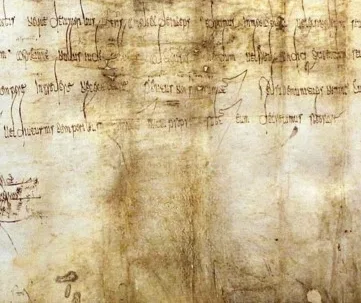
After: the seal removed digitally, with the stained paper texture rebuilt to match.
In the finished image, the wax seal is gone and the page reads as one continuous sheet. The area where the seal used to be carries the same aged tone and staining as the paper around it, so it doesn't show up as a clean, bright patch. There's no outline of the old seal, no smooth blank area, and no obvious repeating texture. Unless you put the before and after side by side, it's hard to tell where the seal sat.
That is really the test of good object removal on an old document. A tidy result that looks too clean is just as much of a giveaway as a sloppy one. The rebuilt area should look exactly as worn, stained and lived-in as everything around it.
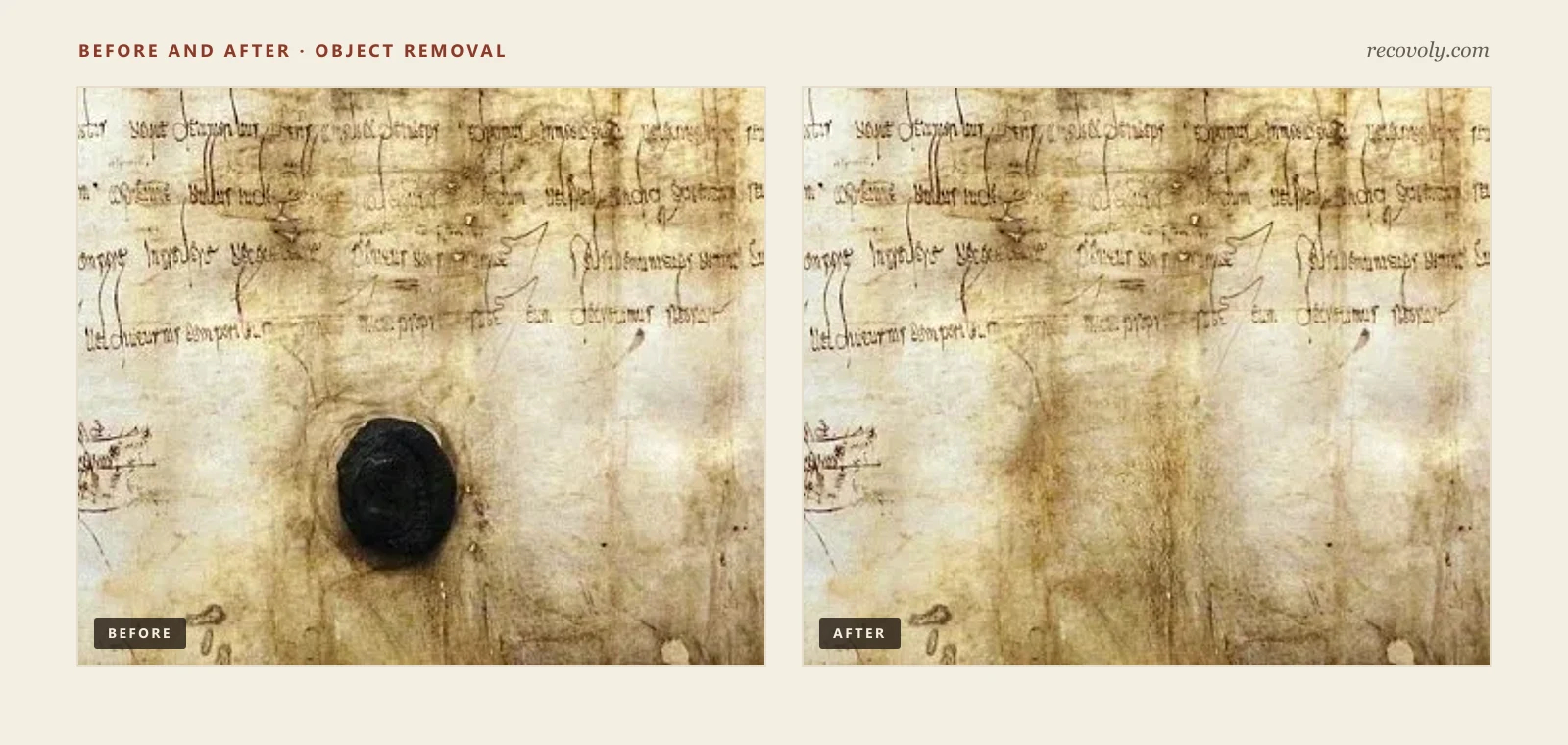
Seal before after comparison
What object removal can and can't recover
It's worth being completely honest about one limitation, because it affects how you should use the result. When an object fully covers part of a page, no software can see through it from a normal scan of the front. A wax seal is thick and opaque, and the camera or scanner only ever records its surface. What object removal does is reconstruct what is most likely to be underneath, based on the paper, texture and patterns around the covered area.
For plain paper, that works extremely well, and the result is usually indistinguishable from the real thing to the eye. If there was writing hidden under the seal, though, the tool cannot recover those exact words. It can continue the paper, and in some cases it might even extend nearby lines in a plausible way, but that's an educated guess, not a reading of the hidden text. The reconstructed area should always be treated as a convincing fill, never as evidence of what was originally there.
If you genuinely need to know what lies beneath a seal or mark, that's a question for an archive or a professional conservation lab. Depending on the mark and the paper, specialist techniques such as transmitted light or multispectral imaging can sometimes reveal details that an ordinary scan can't, without disturbing the document. Physically lifting a wax seal is not the answer, because it can easily tear or stain the paper and destroys a piece of the document's history.
Other marks you can remove the same way
Wax seals are one of the more dramatic examples, but the same approach works for a wide range of marks that end up on old documents over the years:
Rubber stamps and ink stamps, such as archive, library or received stamps added long after the document was created. These are often flat and partly transparent, which makes them a slightly different job from a raised seal. Our guide on how to remove stamps from documents covers them in more detail.
Stickers and price labels, including the small labels that antique dealers and second-hand bookshops often put on the back or corner of a page.
Old tape and tape stains, where an earlier repair has yellowed and left a strip of discoloured adhesive across the paper.
Pen notes and later annotations, like reference numbers or pencil marks written onto a document by someone sorting a collection.
Paper clip marks and other small blemishes, where an object has left an impression or a mark on the sheet.
For most of these, the principle is the same as with the wax seal: mark the object, let the tool rebuild the paper beneath it to match the surrounding texture, and check the edges closely. For more examples, see our page on document object cleanup.
A word on ethics: removing authentication marks
Seals, stamps and signatures on official documents exist for a reason. They show who issued a document, who approved it and when, and people rely on them. Removing authentication marks should always be a deliberate choice, made for study or display copies, and never a way to alter what an official document says or who it appears to come from.
A few simple habits keep things clearly on the right side of that line. Always keep the unaltered scan alongside the edited version, and name the files so there's no confusion about which is which. When you share, print or publish an image with a seal or stamp removed, say plainly that it's an edited reproduction, for example in a caption. And remember that an edited image is never a substitute for the real document. If you need a certificate, licence or record for official purposes, the proper route is a certified copy from the organisation that issued it.
There's also a quieter point about historical documents. A wax seal on an old manuscript is part of that document's story, and the physical seal should stay exactly where it is. Removing it digitally for a clean study image is fine. Removing it from the actual page is not.
How to remove a wax seal from a document scan yourself
You can get a result like the one above at home with a flatbed scanner and an object removal tool such as recovoly, docovly or scripily. The steps are simple, but each one matters.
Scan in colour at 300 DPI or higher. Colour lets the tool see the real tone and staining of the paper it needs to rebuild. For small objects near fine writing, 600 DPI gives it more detail to work with. Clean the scanner glass first, lay the document flat and don't press down on a raised seal, as pressure can crack old wax or strain the paper around it. Switch off any automatic sharpening or colour correction in your scanner software.
Save the raw scan as a lossless TIFF or PNG. This untouched file is your digital original and the version you'll keep for reference. Do all your editing on a copy.
Mark the object generously. When you select the seal, stamp or sticker, include its outer edge, any shadow it casts and any residue or discoloured ring around it. A selection that hugs the object too tightly tends to leave a faint outline behind.
Let the tool rebuild the paper, then zoom in. Check the result at 100 percent or more. Look at the edges of the rebuilt area, the paper texture inside it, and any writing or lines nearby. Watch for blurring, smooth patches that look too clean, or repeating patterns. If something looks off, adjust the selection and try again.
Label and export. Save the edited version as a lossless file for your records and a high-quality JPEG or PDF for printing or sharing. Give it a file name that makes clear it's an edited copy, and keep it alongside the original scan.
Final thoughts
Removing a seal or object from a document scan is one of those jobs that looks simple until you try it on real, aged paper. The difference between a convincing result and an obvious patch comes down to how well the rebuilt area matches the tone, staining and texture of the sheet around it, and modern object removal handles that far better than flat fills or hours of hand cloning.
Used well, it gives researchers, publishers and families clean images of pages that would otherwise be partly hidden. Used carefully, it stays honest: the original scan is kept, edited copies are labelled, nothing hidden is presented as recovered, and the physical document, seal and all, is left exactly as it was found.
If you have a document with a mark you'd like to see past, start with a good colour scan. It costs nothing, it protects the original, and it gives you a safe starting point for whatever you decide to do next.
Frequently asked questions
Can you remove a wax seal from a document scan without damaging the original?
Can AI recover the writing hidden under a wax seal?
What scan resolution should I use to remove a seal or stamp?
Why does a flat colour fill look fake on old paper?
Is it okay to remove a seal or stamp from a document image?
How can I find out what’s actually under a seal?
What other marks can be removed the same way?
Related restoration tools
- #Wax seal removal
- #Object removal
- #AI inpainting
- #Manuscript restoration
- #Historical documents
- #Document scanning
- #Family history

Written by
Thisara Jaso
Document restoration specialists
Thisara Jaso works on document restoration at Recovoly, helping researchers, archives and families get clean, readable images of old and damaged documents.

