
Enhance Your
Scanned Files
Perfect Quality
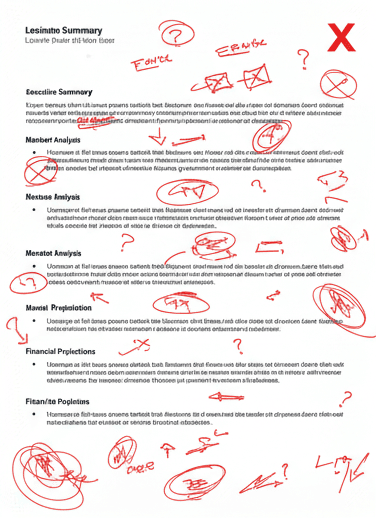
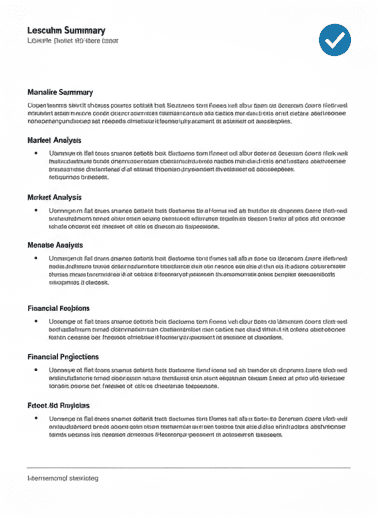
Transform low-quality scans into professional documents with AI-powered enhancement. Sharpen text, correct colors, fix skewing, and optimize for OCR. Perfect for archives, libraries, businesses, and anyone working with scanned documents.
0
Scans Enhanced
0
Quality Improvement
0
Minutes per Doc
0
Institutions Served
0
OCR Accuracy Boost
0
File Formats
Professional-Grade Scan Enhancement
Every aspect of your scan optimized for perfection
Sharpness Enhancement
+85% Clarity
Crisp, clear text and details
Contrast Optimization
+90% Readability
Perfect text-background separation
Color Correction
+88% Accuracy
Restore faded colors naturally
Auto-Straightening
+95% Alignment
Fix skewed and crooked scans
Noise Reduction
+92% Smoothness
Remove grain and artifacts
Background Cleanup
+87% Purity
Remove shadows and textures
Advanced Enhancement Technology
How AI transforms your scans
AI-Powered Analysis
Advanced algorithms detect quality issues and enhancement opportunities.
Our AI identifies blur, noise, lighting issues, and resolution problems across your entire document.
Smart Sharpening
Selective sharpening enhances text without creating artifacts.
Text edges are sharpened while maintaining smooth backgrounds and preserving image quality.
Dynamic Contrast
Intelligent contrast adjustment for optimal readability.
Balances light and dark areas, ensuring text stands out against the background perfectly.
Color Restoration
Restores original colors and removes color casts.
Corrects yellowing, fading, and discoloration while preserving authentic document appearance.
Auto-Alignment
Straightens skewed scans and crops unnecessary borders.
Automatically detects edges and aligns documents perfectly for professional presentation.
Quality Enhancement
Final polish for archival-quality output.
Applies finishing touches for maximum clarity, readability, and professional appearance.
Fix Common Scan Problems
Our AI solves every scan issue automatically
Poor Lighting
96% Improvement
Fix dark or overexposed scans
Blurry Text
94% Recovery
Sharpen fuzzy characters
Low Resolution
89% Enhancement
Upscale without losing quality
Background Noise
93% Removal
Clean speckles and artifacts
OCR Readiness
98% Accuracy
Perfect for text recognition
Barcode Recovery
97% Success
Restore faded codes
Professional Output Formats
Choose the perfect format for your needs
PDF/A (Archive)
Archival-Grade
Ideal for: Long-term preservation
High-Res JPG
300-600 DPI
Ideal for: Web & Sharing
PNG (Lossless)
Perfect Quality
Ideal for: Print & Design
Searchable PDF
OCR-Ready
Ideal for: Research & Text Search
TIFF (Master)
Preservation
Ideal for: Professional Archives
Layered PSD
Editable
Ideal for: Advanced Editing
Advanced Enhancement Features
Powered by cutting-edge AI technology
AI-Powered Enhancement
Advanced algorithms automatically detect and fix quality issues.
Smart Sharpening
Selectively enhances text while preserving image quality.
Dynamic Contrast
Optimizes readability with intelligent contrast adjustment.
Color Correction
Restores faded colors and removes unwanted color casts.
Auto-Straightening
Fixes skewed scans and perfects document alignment.
Batch Processing
Enhance multiple files with consistent quality settings.
Any Language Support
Works with all alphabets, scripts, and writing systems.
OCR Optimization
Prepares documents for perfect text recognition.
Real Enhancement Results
See the dramatic improvement in scan quality
+85%
Sharpness Increase
+90%
Contrast Optimization
+40%
OCR Accuracy Boost
99.5%
Customer Satisfaction
What Our Customers Say
Join thousands who've enhanced their scans
The improvement in scanned document quality is remarkable. Text that was barely readable is now crystal clear. This has transformed our digitization workflow.
Dr. Michael Chen
University Archivist
Stanford, CA
We've enhanced thousands of legal documents. The auto-straightening and contrast optimization are game-changers. OCR accuracy improved by 40%.
Sarah Johnson
Legal Records Manager
New York, NY
19th-century newspaper scans that were unusable are now perfectly readable. The AI handles all types of degradation beautifully.
Prof. David Williams
Historical Researcher
London, UK
My grandfather's old letters scanned poorly, but after enhancement, every word is clear. The color correction brought back the original paper tone.
Emily Rodriguez
Family Historian
Chicago, IL
Our manuscript collection scans have been transformed. Details are sharp, colors accurate, and the preservation quality meets museum standards.
James Thompson
Museum Curator
Boston, MA
Batch processing capability is exceptional. We enhanced 10,000 documents in days. The quality consistency is outstanding.
Dr. Lisa Martinez
Digital Librarian
Seattle, WA
Frequently Asked Questions
Everything about scan enhancement
Ready to Enhance Your Scanned Files?
Transform low-quality scans into professional documents
Free preview • No commitment • Secure processing • Satisfaction guaranteed