
Edit Text in Scanned Documents
Keep the original font.
Edit text in a scanned document without retyping a thing. Mark a line, pick the words, type the new ones - Recovoly rewrites them in the original font, size and ink, on the same aged paper.
Demo on a sample 1924-style newspaper page: a word in the italic deck and a four-word misprint in the small-capital dateline.
0
words to retype - the line is read for you
1+
word or a whole phrase per edit
5
things matched: font, size, spacing, ink, paper
12
text areas per page, rewritten one by one
Pick the words. Type the new ones.
Watch an edit play step by step: the words are selected, the replacement is typed, and the line is rewritten in place.
 Before
Current text · read for you
Replace selected with
Four steps, no retyping
The same studio that restores stains and tears also rewrites text.
Mark the line
Draw a box round the line you want to change. Take the whole line so spacing can adjust around the new words.
It reads the text
The studio reads the words in the marked area for you - free. Nothing to retype.
Pick & type
Tap the words to replace - one or a phrase - and type their replacement. Add a note if you like, e.g. keep the bold weight.
Rewritten in the original
Press Change text. The words are written back in the same typeface, size and ink, on the same paper grain.
Which text can be edited?
Text editing works on most printed and typed pages. This is what gives the cleanest, most natural results - and where to hold back.
Works great
- Printed newspapers, books and magazines
- Typewritten letters, reports and memos
- Printed forms, labels and headings
- Clear, consistent handwriting
Works with care
- Very small or broken type - mark a tight, single line
- Decorative or display fonts - describe the style in the notes
- Lines across folds or stains - restore the damage first, then edit
- Much longer replacements - keep the new text close in length
Better left alone
- Names, dates or figures on official records
- Certificates, IDs, contracts and financial papers
- Signatures
- Anything presented as the unaltered original
Look closely. It's the same type.
Zoom into the corrected dateline - 'WEDNESDAY EVENING, MAY 14' is new, the rest of the line is the original print.
 Move over the text to zoom
Printed
TUESDAY EVENING, MAY 13,
Corrected
WEDNESDAY EVENING, MAY 14,
Typeface & style
Roman, italic, bold, small caps, typewriter and old newspaper faces.
Size & weight
The new words sit at the same size and stroke weight as their neighbours.
Spacing & alignment
Letter and word spacing, and the alignment of the line - centred lines stay centred.
Ink & print texture
Ink tone, spread and the slight unevenness of real print.
Paper & age
The paper grain, tone and ageing behind the letters, so there is no clean patch.
Bring damaged words back, too
Leave the replacement empty and the Text area redraws the same words - sharp, dark and in the original type. Ideal for paragraphs that faded to a ghost or letters broken by a fold.
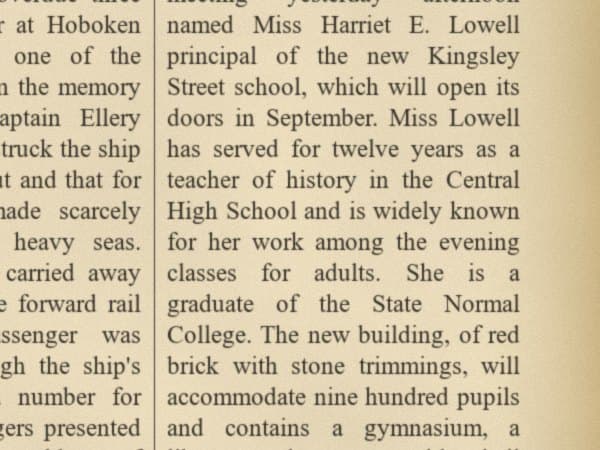
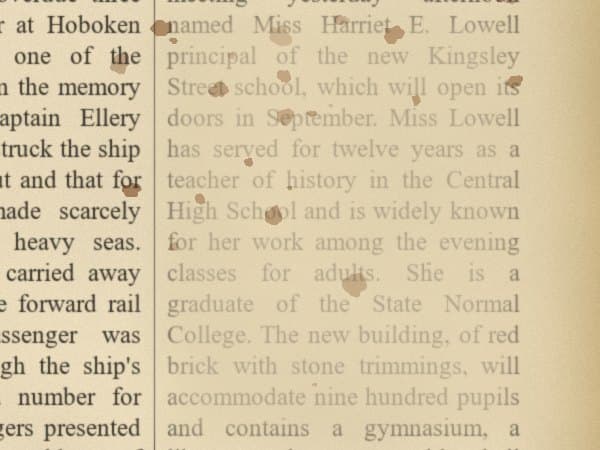
How a line is rewritten in its own font
There is no font file to install and nothing to retype. The new words are drawn to match the print that is already on the page.
- 01
The line is read for you
When you mark a line, its words are recognised and shown as chips, so you pick what to change instead of retyping anything.
- 02
You choose the words
Select one word or a whole phrase and type the replacement. Optional notes like 'keep the bold weight' guide the style.
- 03
The style is taken from the page
Typeface, size, weight, letter spacing, ink tone and paper grain are matched to the letters around your selection.
- 04
New words are drawn in place
The replacement is written into the same line, on the same baseline, so the spacing and alignment continue naturally.
- 05
Only the mark is changed
The rewritten area is blended back into the page. The rest of the line and the page stay exactly as they were scanned.
Several lines to change? Give each line its own Text area. They are rewritten one after another, and you can compare each result with the original before you export.
Six tips for invisible edits
Mark the whole line
When the new words are longer or shorter, the line can re-space naturally.
One line per area
Several lines? Give each its own area - they are rewritten one after another.
Keep the punctuation
Select and type the comma or full stop with the word, as in 'Autumn,'.
Similar length reads best
A word of similar length fits the existing layout with the least movement.
Use the notes field
Optional notes such as 'keep the bold weight' or 'all capitals' guide the style.
Compare at 100%
Zoom in and compare with the original before you export or save.
For restoration and honest corrections
Editing text is powerful. Use it to repair and clarify documents - never to change what a record says.
Great for
- Fixing misprints and typos in reproductions
- Repairing faded, broken or damaged words
- Restoring illegible words from a clean source
- Exhibition labels, replicas and display copies
- Family history books and memorial prints
- Design mock-ups that use period documents
Not for
- Changing names, dates or figures on official records
- Altering certificates, IDs, contracts or financial papers
- Presenting an edited document as the unaltered original
Keep the untouched original alongside any edited copy, and label edited reproductions as such.
Words worth getting right
Newspaper reproductions
Correct a misprinted date or headline before a reprint or anniversary edition.
Museum & exhibition copies
Prepare display copies with repaired or clarified words, keeping the period type.
Books & manuscripts
Rebuild words lost to holes, stains or wear so a page reads again.
Family history
Make faded entries on letters and records legible again for a family book.
Common corrections, before and after
Typical edits people make with the Text area - all on reproductions, restored copies and family papers.
TUESDAY EVENING, MAY 13
WEDNESDAY EVENING, MAY 14
Fix a dateline before a reprint or anniversary edition.
Construction to Begin in Spring
Construction to Begin in Autumn
Correct a headline for an exhibition copy.
Recieved with thanks
Received with thanks
Tidy a printed heading in a family album.
Ha bor Bridge
Harbor Bridge
Redraw letters broken by a fold or a tear.
M ry Ell n
Mary Ellen
Make a faded entry legible for a family history book.
VOL. XLII - No. 12
VOL. XLII - No. 128
Restore a smudged masthead on a newspaper reproduction.
Editing text in scans - questions
Yes. In the AI Restore Studio, draw a box round a line of text and the studio reads it for you. Select the words you want to change, type the new ones and press Change text. The AI writes them back into the image in the same typeface, size and ink, on the same paper.
That is the point of the tool. The AI sees the line you marked, the paper around it and the whole page, and rewrites the words to match the typeface, weight, size, letter spacing, ink tone and print texture of the original - including old newspaper type and typewriter faces.
No. The studio reads the existing text in the marked area. You only pick the words to replace - one word or a whole phrase - and type their replacement. The rest of the line is kept as it was.
Mark the whole line rather than just the word. The line is rewritten as a unit, so spacing and alignment - including centred headings - are adjusted naturally around the new length.
Yes. Leave the replacement empty and use the Text area's quick instructions - 'Make it crisp and dark', 'Fix broken letters' or 'Match the line above'. The same words are redrawn sharply in the original type.
Scans and photos of printed, typed and handwritten pages: newspapers, books, letters, forms, labels and posters, in JPG, PNG, TIFF, HEIC, WebP and more, as well as pages of a PDF. Clear, high-resolution scans give the closest match.
Use it for restoration and honest corrections - fixing misprints and typos, repairing damaged words, preparing reproductions, exhibitions and family history books. Do not use it to alter official, legal, financial or identity documents or to misrepresent what a record says. You are responsible for how edited documents are used, and keeping the untouched original is always good practice.
Keep exploring
The right words, in the original type.
Open a page, mark a line and change it in under a minute.