
Historical Text Document Restore
Read every faded word again.
Restore the text on old manuscripts, parish registers, wills, deeds and family letters. Recovoly lifts darkened parchment, foxing, stains and bleed-through, and strengthens faded ink along the original strokes - so the hand stays the scribe's own, and you can finally read, transcribe and cite it.
Faded ink restored
Original strokes kept
Foxing removed
Historical tone kept
Copperplate hand
Any language works
Animated walkthrough of the Historical Mode Document tool restoring a faded, foxed and water-stained 1789 handwritten letter.
9
kinds of damage fixed in a single click
3
quality levels, from quick triage to Enhanced
Any
language or script - ink is ink
multi-page files in, archive copies out
The document survived. The words are the part that's fading.
A baptism entry, a clause in a will, a line in a letter home - for most historical documents, the text is the document. Yet text is the first thing time takes away. Ink browns and thins, parchment darkens, damp leaves tide-lines straight across the register and old microfilm adds its own grain.
Historical text document restoration is about getting the writing back to a readable state without pretending the page is new. Recovoly's Historical Mode Document tool was built for exactly that: it reads the page, finds what is hiding the text and removes it - and if there is nothing to fix, it gives you the original back untouched.
Readable
Dark, even strokes on a clean ground - easy on the eye at any zoom.
Faithful
The scribe's letterforms and spelling, not a font or a guess.
Transcribable
Better input for you, your volunteers, OCR and HTR.
Still historical
Parchment tone and ink colour stay, so it looks its age.
Six things standing between you and the words
Each one damages legibility in a different way, so each one is handled on its own terms.
Faded and iron-gall ink
Iron-gall ink browns and thins over centuries until whole lines read as a ghost.
Faded strokes are strengthened along the path the pen actually took, so the hand stays the scribe's own.
Darkened vellum & parchment
Skin and rag paper darken to a deep brown that swallows the ink sitting on it.
The ground is lightened and evened out while the text keeps its weight, bringing back contrast.
Foxing and age spots
Rust-brown spots scatter across the page and land on letters, turning e into o and n into m.
Each spot is lifted without bleaching the paper tone or eating into the strokes beneath it.
Bleed-through & show-through
Writing from the reverse shows through the leaf and mixes with the lines you are trying to read.
Ghost text from the other side is suppressed so only the writing on this face remains.
Stains, tide-lines & grime
Water rings, mould bloom and handling dirt sit over registers and letters most of all.
Stains are separated from the ink and removed, and the words inside the tide-line are restored.
Poor or old scans
Microfilm copies, low-contrast scans and phone photos add grain, blur and uneven light.
Noise and grain are reduced, detail is sharpened and the scan is made evenly readable edge to edge.
Real historical pages, restored for reading
Pick a document and drag the handle. Every result keeps the original hand, spelling and layout - only what was hiding the text is gone.
Choose a document
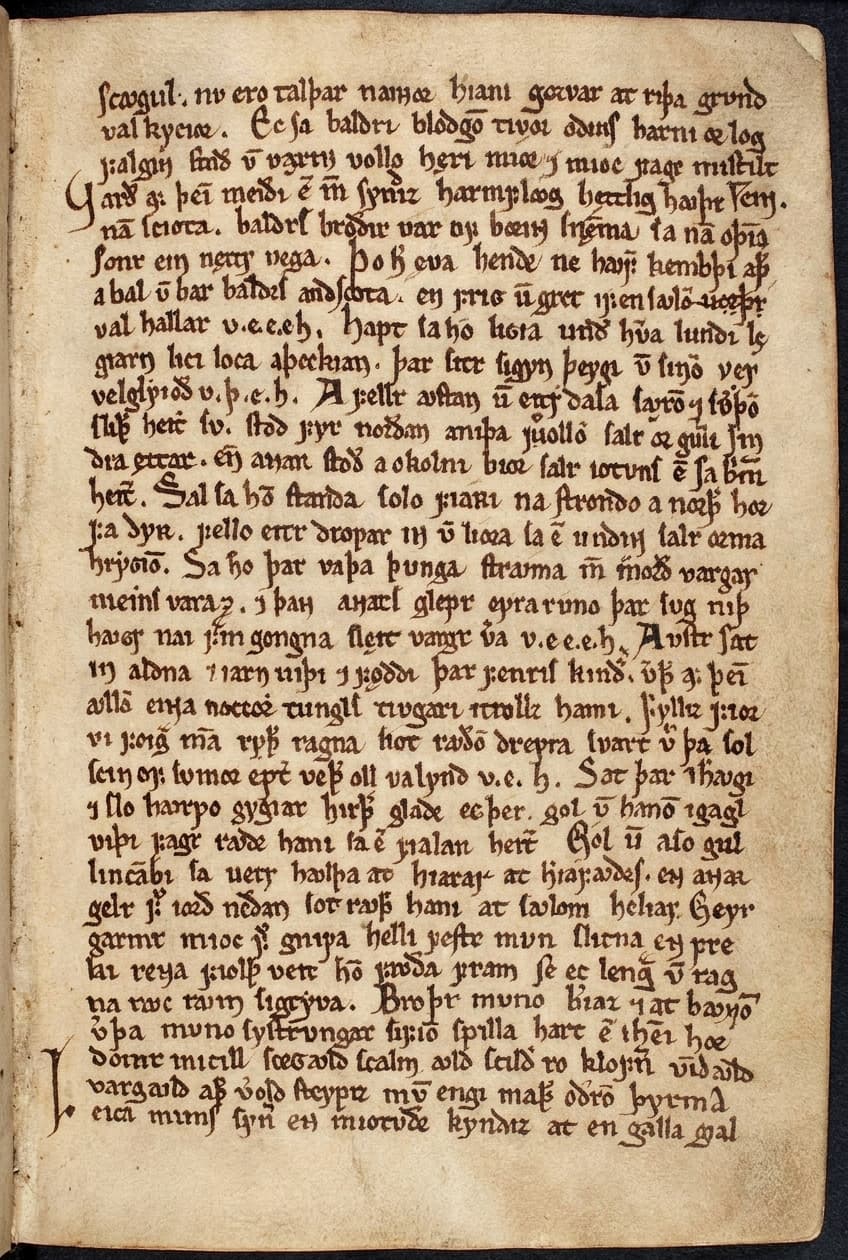
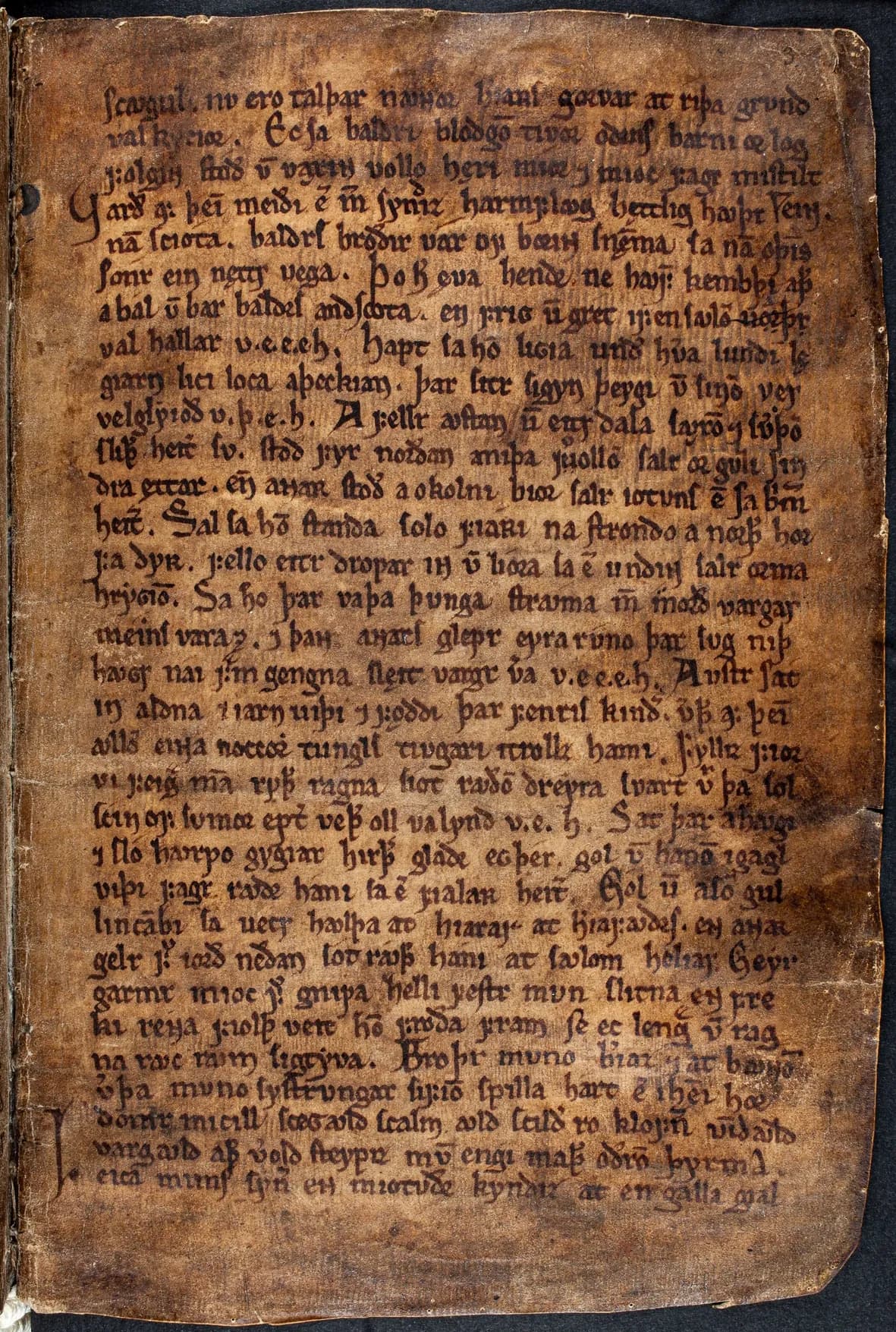
Old Norse vellum
Medieval manuscriptA vellum leaf darkened to deep brown. The parchment is lightened and the script stands out clearly, line by line - every abbreviation mark and the large initial at the foot of the page are kept.
From unreadable to readable in four steps
No image editing, no settings to learn. Log in, upload and restore.
Log in and open the tool
Sign in to Recovoly and open Historical Mode Document from your tools. New here? A free account takes a minute.
Upload the page
Drop in a scan or photo - JPG, PNG, TIFF - or a multi-page PDF of a register, letter bundle or manuscript.
Choose a quality
Pick Fast, Standard or Enhanced. That's the only setting - all nine fixes are included automatically.
Restore, compare, export
Press Restore document, check the result with the compare slider and zoom, then download PNG, JPG or PDF.
Everything it fixes, automatically
Historical Mode handles all nine in a single pass - there is nothing to switch on. It only fixes what is hiding the text, and if a page has nothing to restore, you get the original back.
Enhance text clarity
Defines the edges of every letter so the hand reads cleanly instead of soft and blurred.
Included in every restore
Quick triage or the deepest recovery
Match the effort to the page. Use Fast to sort a box of scans, and Enhanced for the entries you need to read word for word.
Best historical recovery
The deepest recovery, for very faded ink, darkened parchment and pages you plan to transcribe, cite or publish. Worth it when every word counts.
Depth of recovery
Any language. Any hand. Any century.
The restoration works on ink, paper and light - not on vocabulary - so it is just as at home on a Kurrent birth register as on an Arabic deed or an Old Norse saga.
Recovoly restores the image of the writing. It does not transliterate, translate or modernise spelling, so the restored page remains a faithful witness to the original - ready for you, a paleographer or your transcription software to read.
A historical record has to stay a historical record
Researchers cite these pages, courts rely on them and families pass them down. That is why Historical Mode is told to fix only what is obscuring the text - and to change nothing else about the colour, shading or content of the page. When there is nothing to restore, it hands the original back.
Removed
Stains, foxing, darkening, bleed-through, grain
Kept
Letterforms, spelling, notes, seals, layout, tone
The hand itself
Letterforms, slant, ligatures and pen pressure are the scribe's. Nothing is re-lettered in a font.
Spelling & abbreviations
Archaic spellings, suspension marks and contractions stay exactly as written - no silent corrections.
Marginalia & corrections
Later notes, strike-throughs and insertions are part of the record, so they are kept and made readable too.
Seals, signatures & layout
Seals, signatures, ruling and the position of every line stay where they are on the page.
Cleaner pages make better transcriptions
Whether the reader is you, a team of volunteers or a handwritten text recognition model, legibility is the bottleneck. Fix it first.
Capture
Scan or photograph the page in colour at the best resolution you can. Keep the raw file as your master.
Restore
Run Historical Mode on a copy. Compare with the original at full zoom before you trust a reading.
Transcribe & index
Read, key or run OCR / HTR on the restored page. Keep both versions linked in your records.
A tip from archivists: always keep the unrestored scan as the archival master and treat the restored file as an access copy. Recovoly keeps your original next to every restoration, so you can cite both and show exactly what was cleaned.
Made for people who read old handwriting
If your work depends on what an old page actually says, this is for you.
Genealogists & family historians
Read the baptism, marriage and burial entries, census lines and family letters your research depends on.
Historians & students
Work from legible sources for theses, articles and teaching, and quote passages with confidence.
Archives & record offices
Produce readable access copies of fragile originals while the master scan stays untouched.
Paleographers & editors
Bring faint letterforms and abbreviation marks forward before transcribing or preparing an edition.
Transcription & OCR / HTR teams
Give volunteers and handwritten text recognition models a clean page instead of a brown smudge.
Legal & property researchers
Recover names, boundaries and dates from old deeds, wills, probate and court records.
The records researchers struggle to read most
Why not just push the contrast?
Levels and curves darken stains along with ink. Photo enhancers are trained on faces, not quills. Historical text needs its own tool.
| Feature | Recovoly Historical Mode | Manual editing | Generic photo enhancer |
|---|---|---|---|
| Built for historical text | |||
| Removes foxing, stains and bleed-through | Slow, by hand | ||
| Strengthens faded ink along original strokes | |||
| Keeps parchment tone and historical look | If careful | ||
| Works in any language or script | Varies | ||
| Multi-page PDF restore | |||
| No editing skills needed | |||
| Returns the original if nothing needs fixing | N/A |
How to scan historical documents for text restoration
The AI can only bring back ink that the scan captured. A few minutes spent on capture makes the biggest difference to how much faded text is recovered.
Scan in colour, not greyscale
Colour lets the AI tell brown ink from brown stains. Greyscale throws that difference away.
400-600 DPI for handwriting
Small hands, interlinear notes and diacritics need the extra pixels. 300 DPI is the minimum.
Keep the page flat and the light even
Use a book cradle or glass if you can. Avoid flash, glare and raking shadows across the gutter.
Include a margin
Leave a little space round the edges so marginal notes and folio numbers are not cut off.
Save as TIFF or high-quality JPG
Heavy compression smears faint strokes into the background. Keep the best copy you have.
Phone photos work too
Shoot straight on, in daylight by a window, with the phone parallel to the page.
Questions about historical text restoration
It is the work of making the writing on an old document readable again. Recovoly's Historical Mode Document tool looks at the page, finds what is hiding the text - faded or iron-gall ink, darkened vellum, foxing, water tide-lines, bleed-through, grime and scan noise - and removes it, while the letterforms, abbreviations and layout of the original are kept.
No. The tool restores the image of the writing, it does not transcribe, translate or re-letter it. Faded strokes are strengthened along the lines the scribe actually wrote and stains are lifted from around them. If a page has nothing that needs restoring, the original image is returned unchanged.
Any. Because it works on ink and paper rather than on vocabulary, it handles Latin and Gothic book hands, Secretary hand, Copperplate and Spencerian, German Kurrent and Fraktur, Old Norse and Insular scripts, Cyrillic, Greek, Hebrew, Arabic, Devanagari, Chinese and Japanese, and typewritten or printed text of any period.
Yes - this is one of the most common reasons people use it. A restored page with dark, even strokes on a clean background is far easier for a person to transcribe and gives OCR and HTR software cleaner input. Restore first, then run your transcription tool on the restored file.
Parish and civil registers, census returns, wills and probate records, land deeds, court and notarial records, letters and diaries, ship manifests, ledgers and account books, military papers, charters and manuscript leaves - any historical page where the text is the reason the document matters.
JPG, PNG, TIFF and PDF. Multi-page PDFs can be restored page by page and saved back as a single PDF. Results can be downloaded as PNG, JPG or PDF, and your original upload is always kept alongside the restored version.
Fast gives a basic historical cleanup and is useful for quickly triaging a batch. Standard is the recommended balance of detail and speed for most pages. Enhanced gives the best historical recovery and is the one to choose for very faded ink, darkened parchment or pages you plan to publish or transcribe.
Nine things, all in one click: it enhances text clarity, restores faded text and faded ink, removes stains and spots, removes foxing and age spots, cleans background artifacts, reduces noise and grain, improves scan readability and sharpens document details. There is nothing to switch on - the only setting is the quality level.
Yes. The tool keeps the document in a historical look - the parchment or paper tone, the ink colour and the character of the hand stay. It is designed to remove what obscures the text, not to make a medieval leaf look like a modern photocopy.
Scan in colour at 400-600 DPI, keep the page flat, include a little margin around the edges, avoid flash and glare, and save as TIFF or high-quality JPG. A good phone photo in even daylight also works well. The more of the faint ink the scan captures, the more the AI can bring back.
Your uploads and restorations are private to your account and are never published. You can delete a restoration and its original from your project history at any time. See our privacy policy for full details.
Log in to Recovoly (or create a free account), open the Historical Mode Document tool, upload your scan, choose a quality level and press Restore document. You can compare the result with the original using the slider, side-by-side view or zoom, then download it.
More ways to restore old documents
Historical document restoration
Whole-document repair for old records, maps and archives.
Recover faded text
Focused recovery of faded handwriting, print and signatures.
Book & manuscript restore
Pages, plates and bound manuscripts.
Letters & records
Family letters, diaries and personal records.
AI Restore Studio
Mark one area and restore only that area.
Clean damaged pages
Lift stains and grime from entire pages.
Your ancestors wrote it down. Read it again.
Log in, upload a historical page and see the text come back in minutes.
See pricing · Original always kept · Any language