
Restore historical documents.Keep every year of their age.
Historical Mode Document takes the foxing, tide-lines, mould and fading off an old letter, register, log or printed page - and leaves the warm paper, the folds, the edges and the ink colour exactly as history left them. Readable, and still unmistakably real.
- Paper tone & folds kept
- Foxing, stains & mould removed
- Nothing invented
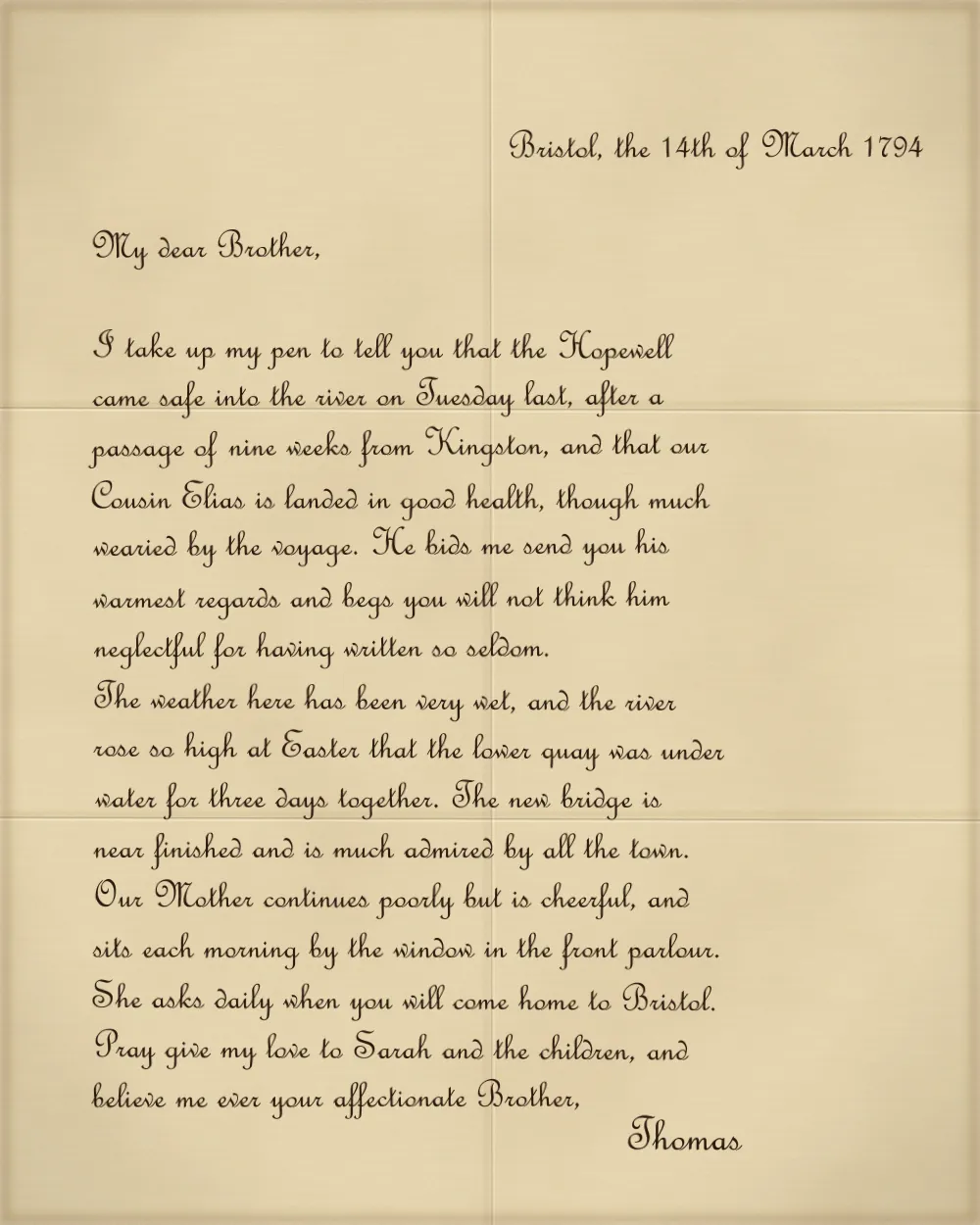
Iron-gall ink restored
Period brown-black
Bristol, March 1794
Folds & paper tone kept
Drag the handle to compare the original and Historical Mode
400+
years of documents, from print to typewriter
3
quality levels, from Fast to Enhanced
Any
language or script
0
holes filled or words made up
Old documents need a different kind of restoration
Ordinary document clean-up has one goal: make the page look like it came off a printer this morning. That is exactly right for a faded office memo or a grubby photocopy. It is exactly wrong for a letter written in 1794.
The colour of the paper, the way the ink has browned, the folds from the post and the wear at the edges are how you know a historical document is genuine. Historical Mode was built to separate those from the damage that actually hides the content - so you lose the stains, not the history.
Original, a generic clean-up, and Historical Mode
Both restored versions are readable. Only one still looks like the document it is.
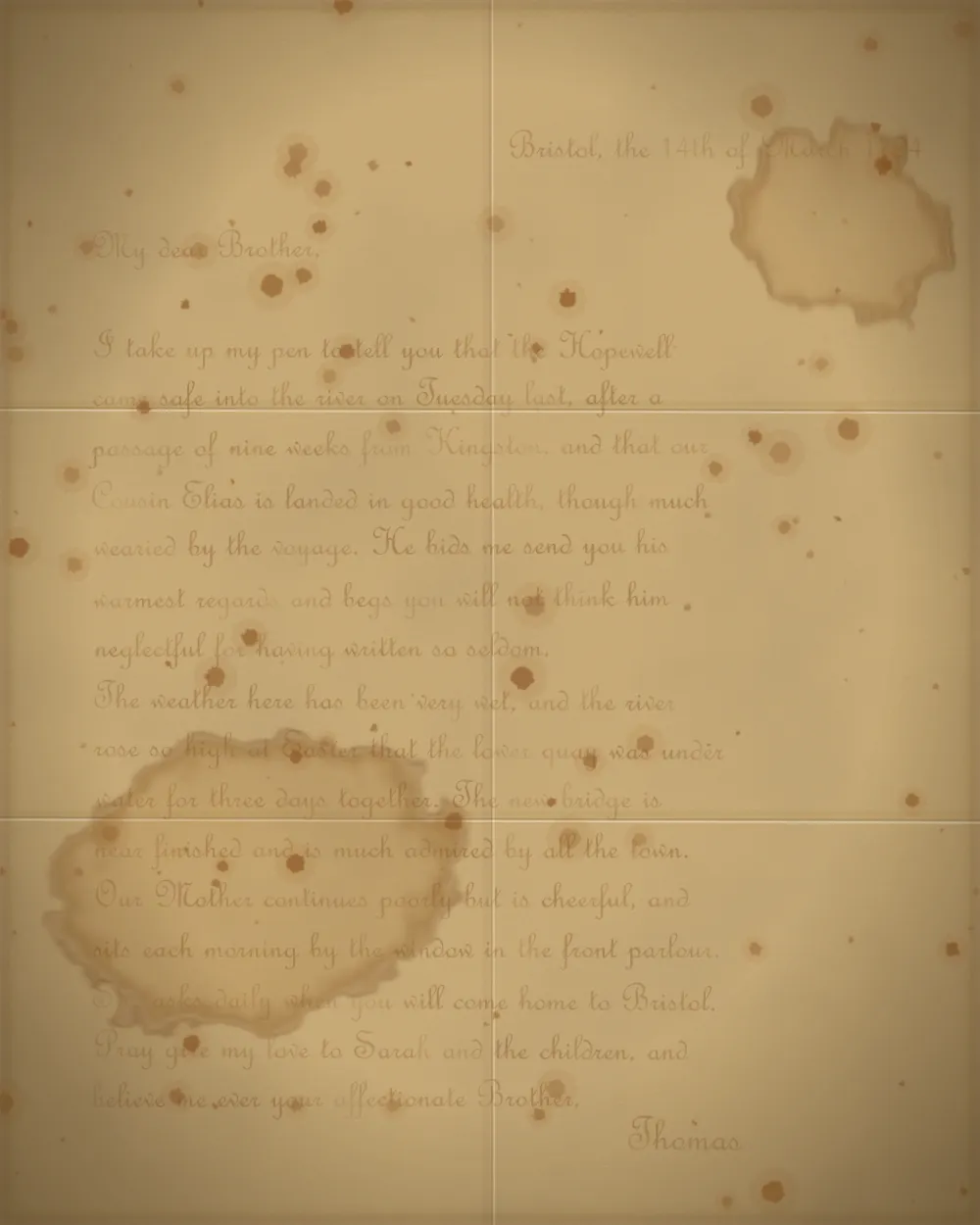
The original scan
- Iron-gall ink faded to pale brown
- Foxing, tide-lines and age spots over the words
- Paper darkened until the ink barely shows
- Paper, folds and edges tell you its age
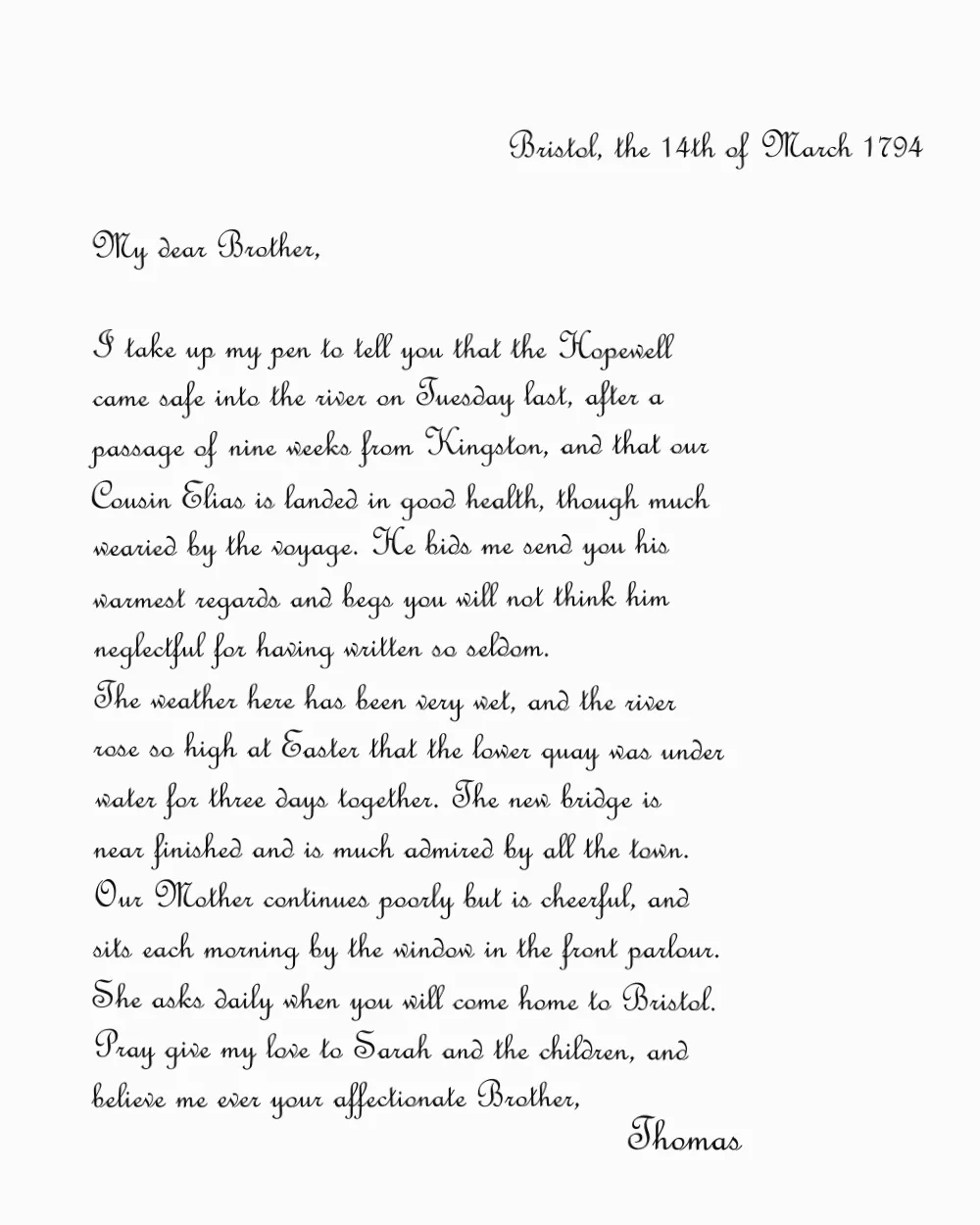
A generic "make it new" clean-up
- Text is dark and readable
- Paper bleached to flat white - looks like a printout
- Folds, texture and edges wiped away
- Brown ink turned to grey-black; the page looks artificial
Recovoly Historical Mode
- Ink restored to a deep, period brown-black
- Foxing, tide-lines and spots removed
- Warm paper tone, texture and folds kept
- Still unmistakably a 1790s letter
Lose the damage. Keep the history.
Historical Mode draws a clear line between what hides the document and what is the document.
Removed
- Foxing and rust-brown age spots
- Water tide-lines and damp stains
- Mould bloom and grime
- Overall browning that swallows the ink
- Bleed-through from the reverse
- Scan noise, glare and uneven light
Kept
- Paper colour, grain and texture
- Fold lines and handling creases
- Deckle, torn and worn edges
- Worm holes and losses - never filled
- Ink colour, pen pressure and letterforms
- Ruling, printed ornaments and marginal notes
Each era damages documents differently
Paper, ink and storage changed over 400 years, and so did the way documents decay. Pick a period to see what Historical Mode does with it.
1790s
Handwritten letters
- Made with
- Laid rag paper, iron-gall ink, quill pen
- Typical damage
- Iron-gall ink fading to brown, foxing, tide-lines, fold wear
In Historical Mode. Faded iron-gall strokes are strengthened along the path of the quill, and the stains are taken off the paper - but the letter is still folded in thirds and the paper still looks two hundred years old.
Working with 20th-century typed records, carbons or photocopies? Text Rescue is built for those.
The worm holes are still there. That's the point.
Zoom into the 1683 proclamation. Historical Mode clears the foxing and show-through around the holes, but never paints over a loss or writes in a missing letter.
Original
Worm holes, foxing and show-through
Generic clean-up
Holes kept, but the page looks new
Historical Mode
Holes kept, page still 1683
It knows what the document is made of
Historical Mode treats parchment differently from wood-pulp paper, and iron-gall ink differently from printing ink - because they age differently.
Parchment & vellum
Animal skin darkens and cockles. Historical Mode lightens the ground but keeps its natural colour variation and follicle texture.
Rag paper
Cotton and linen paper is strong but foxes. Spots are removed; chain and laid lines in the paper are left alone.
Wood-pulp paper
Acidic 19th and 20th-century paper browns and turns brittle. Browning is reduced without making it look like modern copy paper.
Iron-gall ink
Starts black, fades to brown and can eat the paper. Strokes are restored to a deep period tone, not flat digital black.
Carbon & lampblack ink
Stable but sits on the surface and wears off. Worn strokes are strengthened where traces remain.
Printing ink
Letterpress impressions, ornaments and red second colours keep their weight, bite and colour.
Pencil
Graphite notes and annotations in margins are kept and made legible along with the main text.
Copying & aniline ink
Purple copying ink and letter-book copies are separated from the tissue they bleed into.
Restoration with a conservator's restraint
Paper conservators work to a simple idea: do what is needed to save the object, and nothing more. Historical Mode follows the same idea on screen. It is confident about removing damage and careful about everything else.
Non-destructive
Restoration happens on a scan. The physical document is never touched, and the original image is kept beside the restored one.
Faithful
Only what hides the content is removed. No words are written in, no holes are filled, nothing is redrawn in a font.
Honest about age
Folds, wear, paper colour and later notes are part of a document's history, so they stay visible.
Comparable
Slider, side-by-side and zoom views let you check every change against the original before you use it.
Restored copies that still feel like the original
When a historical document is going to be seen - printed, framed, displayed or shared - its age matters as much as legibility.
Family history books
Letters, registers and diaries reproduced so relatives can read them - and still see they are old.
Exhibitions & displays
Facsimiles and panels for local-history societies, libraries and small museums.
Teaching with sources
Primary sources students can actually read, without losing the feel of the original.
Books & publishing
Illustrations for local histories, biographies and articles that keep their period character in print.
Digital archives
Access copies for online collections, while the master scan stays untouched.
Gifts & framing
An ancestor's letter or a parish entry restored for framing, still clearly old.
Restore a historical document in Historical Mode
No retouching skills. Upload a scan, choose a quality and compare.
Log in
Sign in and open Historical Mode Document from your tools.
Upload a scan
JPG, PNG, TIFF, HEIC, WebP or a multi-page PDF.
Choose a quality
Fast, Standard or Enhanced, depending on the page.
Compare
Check the restored page against the original with the slider or zoom.
Download
PNG, JPG or PDF for print, display or your archive.
Three quality levels
Fast
Quick pass to sort a batch and find the pages that need more work.
Standard
Recommended for most letters, registers, logs and printed pages.
Enhanced
Deepest recovery for very faded ink, dark paper and pages you will print or exhibit.
Scanning historical documents safely
The best restoration starts with a good scan - taken without putting the original at risk.
Colour, always
Colour lets the AI tell brown ink from brown foxing. Greyscale makes them the same thing.
400-600 DPI
Fine handwriting, printed ornaments and paper texture need the extra resolution, especially for printing later.
Don't force it flat
Never press a fragile fold or a tight binding. A slight curve is fine; a cracked page isn't.
Soft, even light
Avoid flash and direct sun. Two lamps at 45 degrees, or a bright overcast window, work well.
Show the edges
Leave a margin around the page. Edges, deckle and tears are part of what Historical Mode keeps.
Keep the master
Save your best untouched scan as TIFF or high-quality JPG and restore from a copy of it.
Historical Mode questions, answered
Historical Mode Document is a restoration mode built for old documents. A general clean-up tries to make a page look new - white paper, black text, no marks. Historical Mode does the opposite of that: it removes the damage that hides the content, like foxing, tide-lines, mould spots, browning and faded ink, but keeps the paper tone, texture, folds, ink colour and other signs of age that make the document what it is.
More ways to work with old documents
Historical text restore
Focused on reading old handwriting and manuscript text.
Historical document restoration
Overview of restoring old records, maps and archives.
Text Rescue
For hard-to-read typing, carbons, pencil and photocopies.
Genealogy records
Census lines, registers and family records.
Old handwritten letters
Folds, holes and faded ink on family letters.
Remove yellowing
When you do want a lighter, cleaner page.
Let the document look its age. Just let people read it.
Upload a letter, a register page, a log or a printed sheet and see it restored in Historical Mode - stains gone, history intact.