
Text rescue for
hard-to-read documents.Get the words back.
Pale typing on yellowed paper, a soft carbon copy, pencil that has rubbed away, a phone photo with a shadow across it, a photocopy of a photocopy. Recovoly finds the text that is still on the page and makes it readable again - without guessing a single word.
- Works with the ink that's left
- No words guessed or retyped
- Scans, photos & PDFs
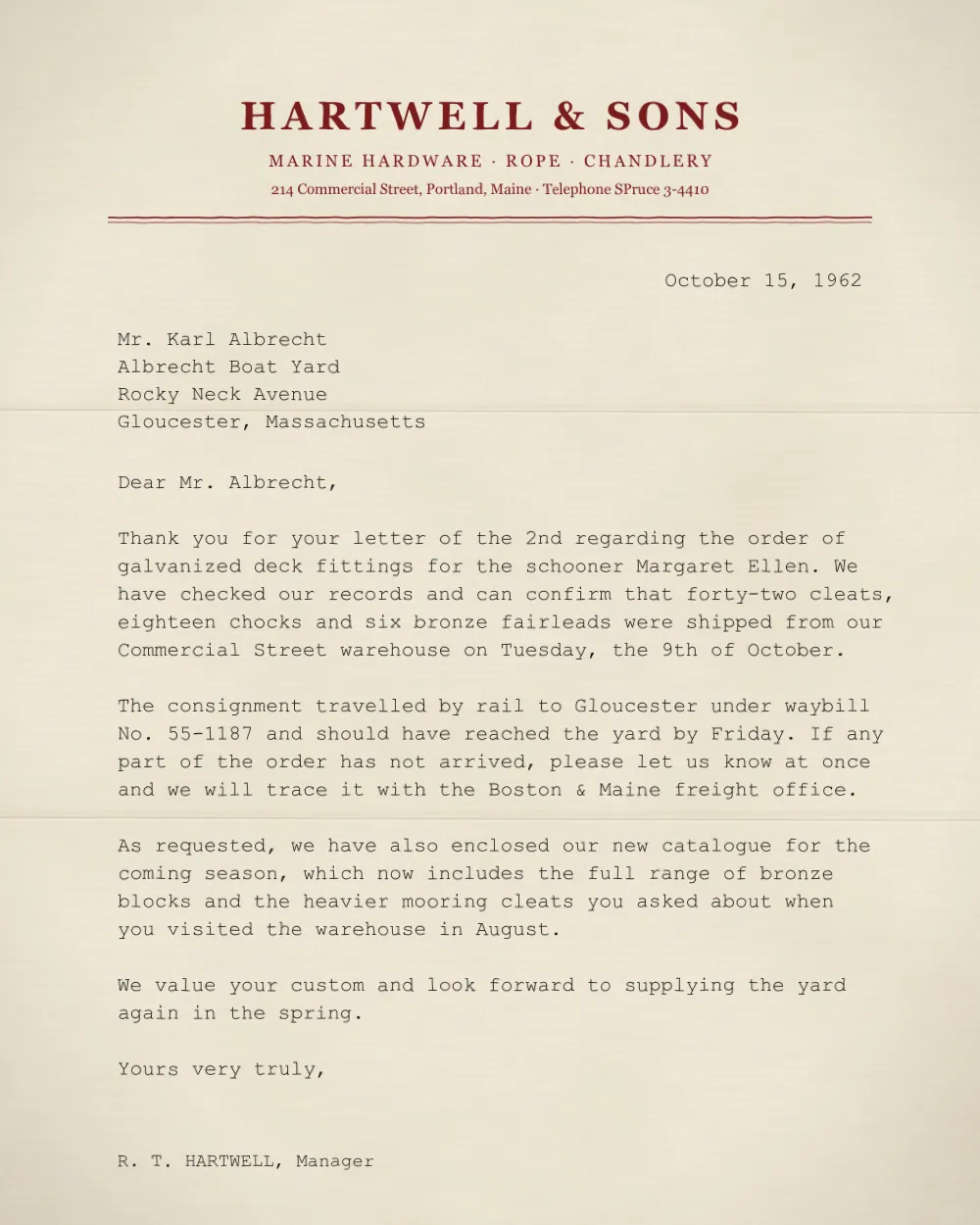
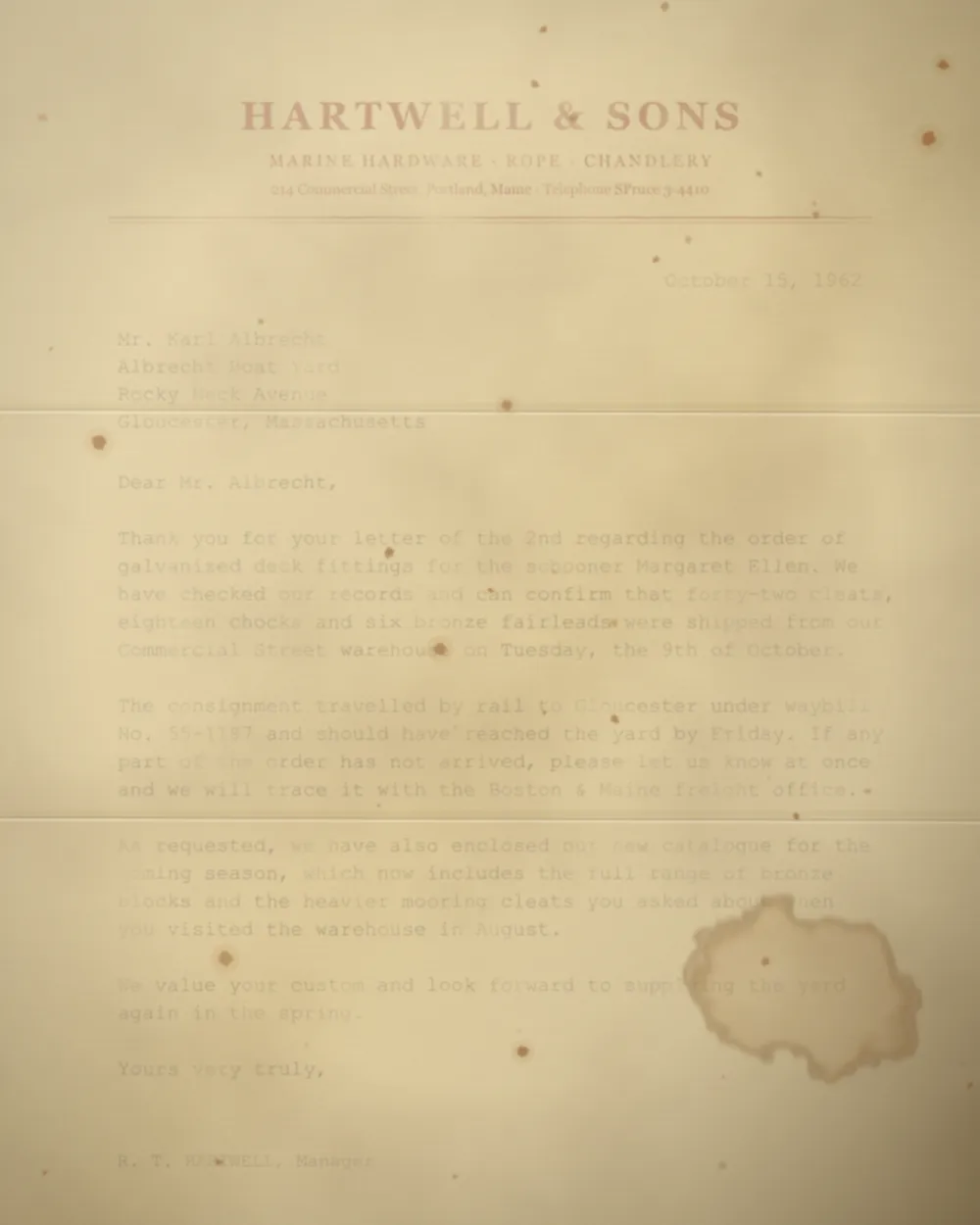
Contrast restored
Same typed characters
Letter, Oct. 1962
Portland, Maine
Drag the handle to compare the original and the rescued page
5
kinds of hard-to-read pages, one tool
0
words invented or retyped
multi-page files in and out
1
click from unreadable to readable
Most unreadable documents aren't damaged. The text just can't compete with the page.
When you can't read a document, it's rarely because the words have gone. They are usually still there - just too close in tone to the paper behind them. Old ribbon ink meets yellowed paper. Purple carbon sits on grey copy paper. Silver graphite reflects the same light as the page. A shadow pushes half a recipe into the dark.
Text rescue document restoration pulls those two apart again. Recovoly identifies the strokes that belong to the writing, strengthens them, and clears away the tint, stains, speckle and shadow that were hiding them. The page still looks like your page. You can just read it now.
Contrast between text and paper
Illustrative. Amber is how much the text stands out from the paper on the original; black is after the rescue on the samples on this page.
Five reasons a page becomes unreadable - and what the rescue does about each
Pick the one that looks like your document. Every example below is the same page before and after, so you can see exactly what changes and what doesn't.
Typewritten letter, 1962
The typing has gone pale and the paper has gone yellow
Why it happens. Typewriter ribbon and office ink lighten with age while the paper browns, so the two meet in the middle. Add a fold, a coffee ring and uneven light from the scanner lid, and whole lines disappear into the page.
What Text Rescue does
- Lifts the yellow cast without bleaching the paper white
- Strengthens each typed character along its own edges
- Removes the ring stain and spotting from behind the text
- Evens out the lighting from corner to corner
Zoom in. The letters are the same letters.
At three times the size you can see what a rescue really does: the same strokes, in the same places, made dark enough to read. No new shapes appear.
Typed words
"forty-two cleats" on the 1962 letter
Carbon typing
Dates and times on the 1957 carbon memo
Pencil words
"Mr. Pryce showed us the old mill race"
What can be rescued - and what can't
Text rescue strengthens what is left on the page. Here is how that plays out, from a page that needs nothing to a spot where the ink is truly gone.
Crisp
Dark text on clean paper. Nothing to rescue.
Not neededFaint
Readable if you squint, tilt the page or zoom in.
RescuedGhosted
You can tell there is writing, but not what it says.
RescuedFragmentary
Only parts of letters are left - a trace of each stroke.
Often rescuedGone
No ink, graphite or toner remains in that spot.
Not inventedIf a word is completely gone, Recovoly leaves the gap. We think that matters: a rescued document should still be the document you started with, so you can trust what you read on it.
Readable, and still your original page
The point of rescuing text is to read what was actually written. So the rescue is careful about what it leaves alone.
Your words, not a font
Characters are strengthened where they are. Nothing is retyped, re-lettered or replaced with a typeface.
Handwriting stays yours
Slant, pressure, crossings-out and mistakes are part of the page, so they are kept and made readable too.
The layout doesn't move
Lines, columns, headings and margins stay exactly where they are on the page.
The original is untouched
Recovoly works on a copy. Your upload stays as it was so you can always compare the two.
The documents people bring to Text Rescue
Not museum pieces - mostly the everyday paper that families, offices and clubs kept, copied and photographed.
Old office files
Typed letters, memos and carbon copies from filing cabinets and storage boxes.
Typed carbon copies
File copies of letters, memos and reports typed through carbon paper.
Notebooks & diaries
Pencil notes, school exercise books and journals rubbed faint by handling.
Family recipes
Recipe cards and handwritten pages photographed in a kitchen.
Club & society records
Minutes, membership lists and newsletters that were copied many times.
Letters & postcards
Faded typing, light ink and pencilled postscripts.
Study material
Old handouts and photocopied readers that have gone grey and speckled.
Research copies
Archive printouts and reader-printer copies that are too light to quote from.
If you can barely read it, neither can your OCR
Text recognition software reads contrast. Feed it a soft carbon copy or a speckled photocopy and it returns nonsense: broken words, wrong numbers and characters it skips altogether. Rescue the page first and the same software has clean, dark characters on a plain background to work with.
- Searchable PDFs that actually find the word you search for
- Copy and paste passages from old typed memos
- Faster transcription of minutes, letters and notes
3. Treasur?r's report. Rents co1lect.d for the year c=me to 4l2 pounds.
3. Treasurer's report. Rents collected for the year came to 412 pounds.
Illustration based on the 1978 minutes shown in the examples above.
From can't-read to can-read in five steps
No levels, curves or brushes. Upload the page and compare the result.
Log in
Sign in to Recovoly, or create a free account in under a minute.
Upload the page
A scan, a phone photo or a PDF. JPG, PNG, TIFF, HEIC and WebP all work.
Pick a quality
Use a quick pass to triage a batch, or the highest quality for the faintest pages.
Compare
Drag the slider or zoom in to check every word against the original.
Download
Save the readable copy as PNG, JPG or PDF, ready to print, share or OCR.
Capture tips for each kind of hard-to-read page
A rescue can only work with what the scan or photo caught. A few minutes here makes the faintest pages come back further.
Faint or yellowed pages
Scan in colour, not black and white. Colour is how the AI tells yellowed paper from pale ink.
Carbon copies
Put a sheet of white paper behind thin carbons before scanning so the back doesn't show through.
Pencil
Avoid the scanner's auto-enhance and flash. Both bleach graphite. Diffuse daylight is best.
Phone photos
Hold the phone flat above the page and step to the side so your own shadow isn't on it.
Photocopies
Use the best-generation copy you have. Every copy you skip is detail you keep.
Resolution
300 DPI is the minimum for small type; 400-600 DPI helps with handwriting and fine print.
Text Rescue vs. turning up the contrast yourself
Darkening a scan in a photo editor or a scanner app darkens everything - stains, speckle and shadows included. A rescue treats the text and the page separately.
| Feature | Recovoly Text Rescue | Photo editor | Scanner app filter |
|---|---|---|---|
| Built for hard-to-read text | |||
| Handles carbon, pencil, shadows and photocopies | By hand, each one | Partly | |
| Strengthens strokes instead of just darkening the page | |||
| Removes stains and speckle behind the words | Slow, by hand | ||
| Keeps paper, colour and ruling looking real | If careful | ||
| Never retypes or replaces words | |||
| Multi-page PDF in one go | Varies | ||
| No editing skills needed |
Text rescue questions, answered
It is restoration aimed at one thing: getting the words on a hard-to-read document back to a state you can read. Instead of trying to make the whole page look new, Recovoly works out what is getting in the way of the text - faint ink, low contrast, a shadow, toner noise, smearing or a tinted background - and removes that, while strengthening the strokes that are still there.
When the problem is more than hard-to-read text
Fix faded text
Focused recovery for faded ink and print.
Fix blurry text
Sharpen soft, out-of-focus words on scans and photos.
Remove shadows
Even out hand and phone shadows on document photos.
Enhance scanned files
Contrast and detail for any scan.
Historical Mode
Restore centuries-old documents without losing their age.
Restore old letters
Folds, holes and faded ink on family letters.
That page you gave up on? Try it again.
Upload the letter, the carbon, the notebook or the photo. See the words come back in seconds, and compare every line with the original before you download.